

A negative keyword's match type determines which searches it excludes. Before adding one, check unwanted queries and useful buyer queries against the same proposed exclusion.
This guide covers Search campaign examples. Other inventory and campaign types have their own rules. “Not blocked” in the examples means the specific negative does not exclude the query; it does not guarantee that an ad will appear.
Start with the actual search and the business reason
A search term is what someone searched for. A keyword is part of the advertiser's targeting. Google's search terms report guide distinguishes the two.
Record the query and explain why it is unsuitable. “Not a service we offer” gives the reviewer a clear reason. “Looks informational” needs closer review if buyers research before requesting a quote.
Consider a fictional repair business that does not sell spare parts. It sees searches for buying parts. The exclusion should reflect that business decision while preserving searches for the repair service. A negative selected only because a query has not converted yet may remove a relevant buyer without enough evidence.
Review any existing exclusions too. If an earlier negative already blocks the query, adding another may make the list harder to understand without improving it.
The three Search negative match types
Google documents these rules for Search:
- Broad: excludes a search containing all negative terms, in any order.
- Phrase: excludes the terms together in the same order, including searches with extra words.
- Exact: excludes that ordered search without extra words.
Negatives do not expand to synonyms or singular and plural variants. Google says casing and misspellings are handled automatically. About negative keywords
Choose the exclusion deliberately. A broad negative can be suitable for an unwanted combination, but a single-word exclusion can cover many useful queries.
Work through one fictional query table
Suppose the proposed negative is spare parts. This table applies the rules above:
| Search | Broad: spare parts | Phrase: "spare parts" | Exact: [spare parts] |
|---|---|---|---|
| spare parts | Blocked | Blocked | Blocked |
| buy spare parts | Blocked | Blocked | Not blocked |
| parts spare | Blocked | Not blocked | Not blocked |
| spare part | Not blocked | Not blocked | Not blocked |
| replacement components | Not blocked | Not blocked | Not blocked |
The example shows exclusion behavior only. It does not report a campaign test, search demand or the quality of these queries for a real business. The rules and limits are described in Google's negative keyword guidance.
Build a table for your proposed negative. Include buyer queries you want to preserve alongside those you want to exclude.
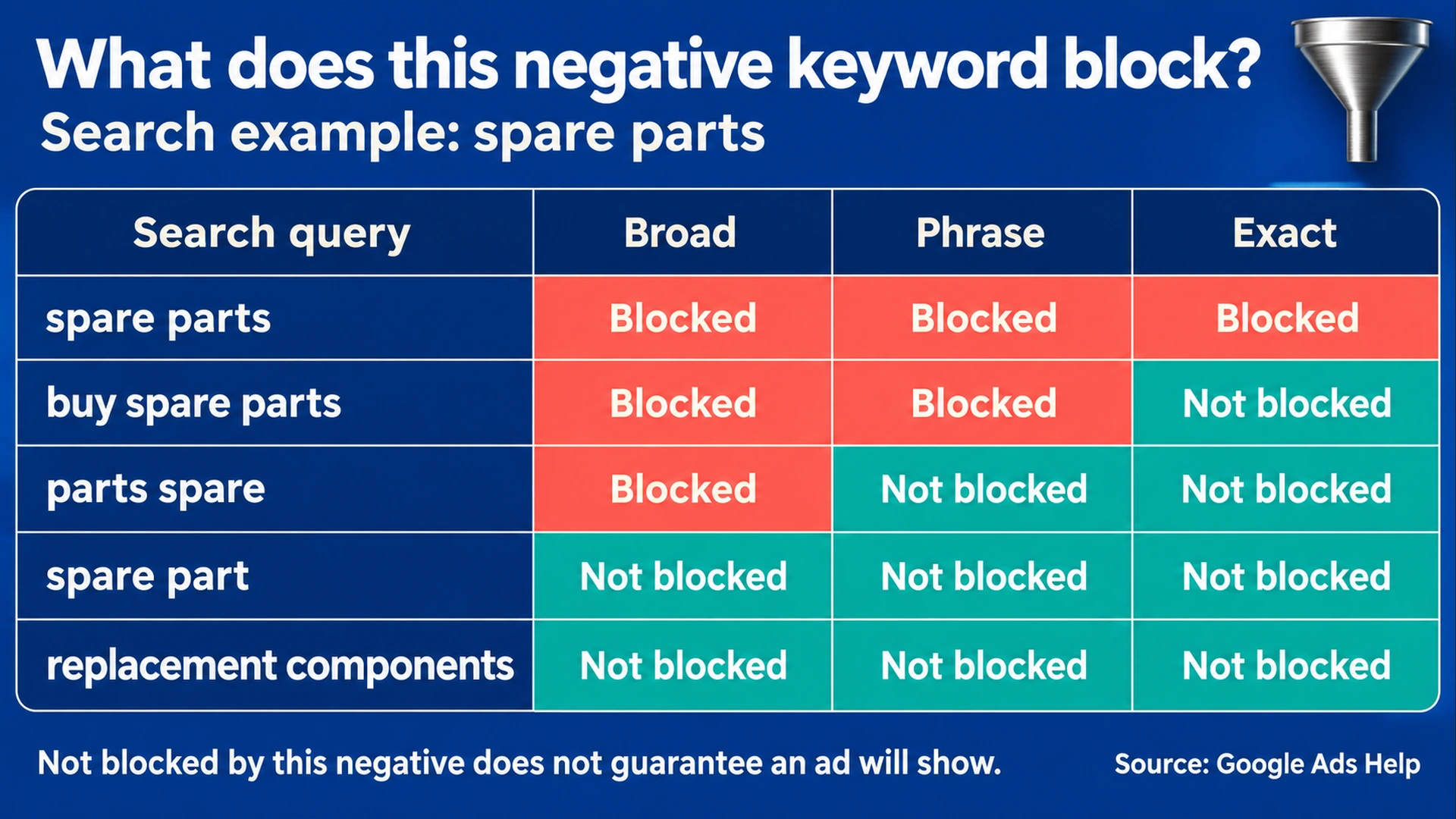
Illustrative Search matching rules for “spare parts.” “Not blocked” means this particular negative does not exclude the query; it does not guarantee ad serving.
Protect a valuable search before approving the exclusion
Consider the negative free for a business offering a paid service with a free consultation. That exclusion may conflict with the offer you want to advertise. “Free” is not automatically irrelevant to a paid business.
Similarly, jobs may be useful for excluding recruitment queries in one campaign but conflict with another campaign selling job-management software. A list that seems sensible for one product can be unsuitable for another.
Write a short explanation beside each proposed exclusion:
Exclude this because the campaign sells repair appointments and does not sell parts. Preserve queries from people seeking a repair quote, including those who describe a faulty part.
Use that business reason to judge the candidate searches before choosing the match type.
If one unwanted query is clearly identified but the broader phrase is ambiguous, consider a narrowly defined exclusion while you investigate the other queries. Do not turn a single observation into an account-wide rule without reviewing the other products and campaigns it affects.
Match type and scope are separate decisions
Choose both the matching behavior and where the negative applies. Google's instructions for adding negatives cover ad groups, campaigns and lists applied to campaigns. Check the destination before saving a change.
An ad-group exclusion can address a mismatch within a particular group. A campaign exclusion applies more widely. A shared list needs review of each campaign that uses it.
Account-level exclusions reach relevant Search and Shopping inventory across campaign types, according to Google's account-level documentation. Use that scope only when the exclusion is appropriate across the affected inventory.
Imagine a business with repair-service and spare-parts campaigns. An account-wide parts exclusion would conflict with one of its offers. The correct scope depends on the business arrangement, not simply on which setting is easiest to find.
Use the report, but recognize its omissions
The search terms report gives you evidence from actual searches associated with your ads. It does not expose every query. Google says some low-activity terms are omitted for privacy; search terms insights can group such activity without exposing the individual searches. Search terms report documentation
Treat the visible report as a source of evidence, not a complete inventory. If an exclusion review finds no unwanted query in the visible rows, that does not establish that every search is relevant.
Use the report alongside the campaign's offer, landing page and current targeting. Keep a record of why an exclusion was selected and the date it changed. Later reviewers can then distinguish a deliberate business choice from a copied list.
Review generated lists line by line
An assistant can propose candidate negatives, group queries and build a test table. Its proposals still need review against the business's actual offer.
Ask it to produce the reason, match type, intended scope and a useful query that might be excluded. That last field forces attention to the cost of the decision.
For example:
For each proposed Search negative, provide:
- Actual unwanted query or business reason
- Proposed negative wording
- Match type
- Campaign, ad group or list receiving it
- One unwanted query it excludes
- One valuable query to test for accidental exclusion
- Unresolved questions
Do not apply changes.
This prompt defines a review output. It does not authorize account changes or establish that the proposed matching table is correct. Compare it with current Google documentation before saving an exclusion.
Keep a decision worksheet
Search negative review
Campaign and offer:
Observed search term:
Why this search is unsuitable:
Proposed negative:
Match type:
Scope and affected campaigns:
Unwanted queries checked:
Valuable queries checked:
Relevant variants considered:
Existing exclusions checked:
Evidence and date:
Decision, reviewer and change date:
After a permitted change, review later search-term evidence and relevant performance measures. A reduced number of visible irrelevant queries alone does not prove that valuable traffic was preserved or that profitability improved.
Check the affected campaigns and useful queries before saving the exclusion. For the wider review, use the AdPilot audit checklist and irrelevant-clicks guide.